 English





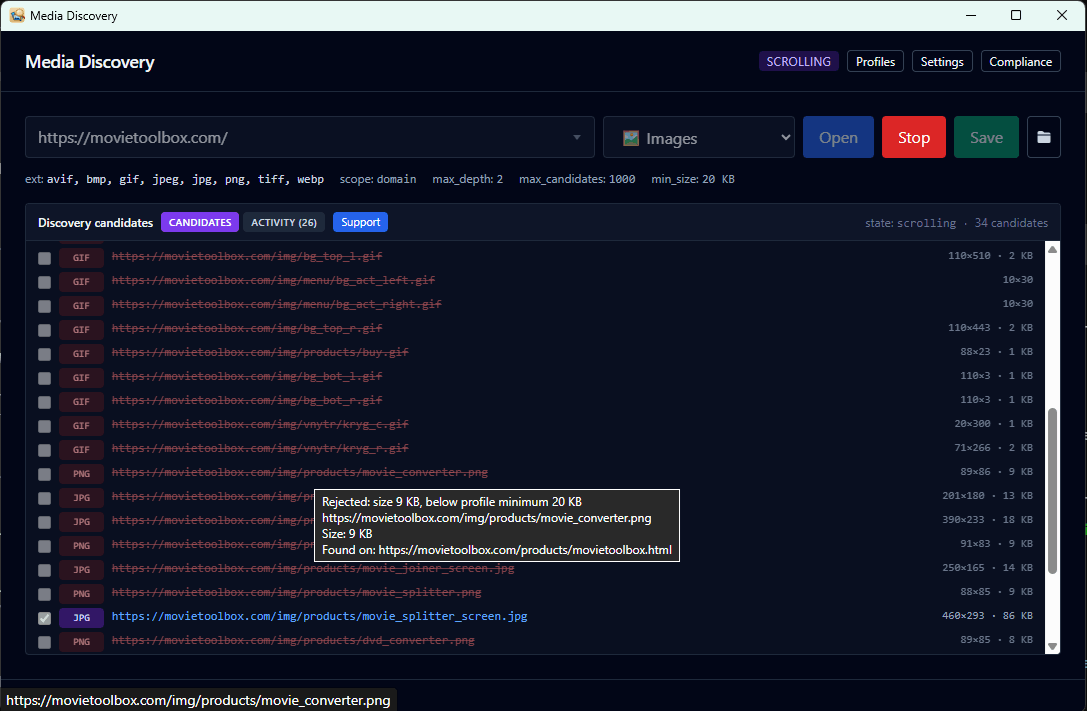
Media Discovery is a desktop app for Windows. Open a web page in its built-in browser, choose a filter profile, and the app follows the links from that page and collects matching media — images, videos, audio, archives — into one results panel. Pick the items you want, press Save, and the files land in your Downloads folder organized by site and page.
Every filter profile is a named set of rules: file kinds, minimum and maximum file size, image dimensions, scope (single page, same domain, or subdomains), allowed and excluded domains, link substring patterns, and per-host delay. You can edit a built-in profile, clone one as a starting point, or build your own from scratch.
The app does not log into accounts on your behalf and does not bypass paywalls or DRM. It honours robots.txt — sites that opt out of automated crawling are skipped automatically. Your settings, profiles, and downloaded files stay on your machine.
System requirements: Windows 10 or 11, 64-bit, ~50 MB free disk space, Microsoft Edge WebView2 Runtime (installed automatically by the installer if missing). No administrator privileges — installs per-user.